


Flymat: Live Flight Tracker
4.368.00 Reviews
App Specs
- Version
- 2.1.2
- Updated On
- License
- Free
- Downloads
- 1,000,000+
- Developer
- Wallet Passes Alliance
- Categories
- Travel & Local
- Platform
- Android
Screenshots



 Analysis by AppCompare
When I want a quick sense of what is happening in the sky, I value a map more than a wall of flight numbers. Flymat: Live Flight Tracker is built around that simple appeal: it lets me follow aircraft visually and check a flight’s status without turning a passing plane into a research project. It is an approachable travel and local app, although its usefulness depends on what you expect from a tracker and how reliably you can get online.
A quick fit for curious observers and travelers
I find the strongest case for Flymat is the mix of casual discovery and practical checking. You can open it because a plane overhead caught your eye, or because someone you know is travelling and you want a clearer picture of their journey. Those are different needs, but a live map gives both a shared starting point: find the aircraft, then use the flight information and status to understand what you are seeing.
A realistic use is meeting a friend arriving after work. Rather than repeatedly asking whether the plane has taken off or landed, you can check the flight’s progress and get a sense of its position. I would still treat the app as a helpful companion, not as a replacement for the airline’s own messages or airport announcements when a connection, pickup, or tight schedule depends on exact details. A map can make progress easier to follow, but travel decisions should rest on the information from the people operating the flight.
What the current version tells me—and what it cannot promise
Flymat is developed by Wallet Passes Alliance, and its current release is version 2.1.2. It arrived on January 17, 2024, so there is a clear release point and a defined current version to use as a reference when deciding whether to install it. Those facts tell me where the app stands as a product, but they do not establish a particular feature history or prove how much has changed between releases. I would separate that confirmed present-day snapshot from any expectation that future versions will add specific tools.
That distinction matters because flight tracking is a live-data experience. Even a well-presented map is only as useful as the information reaching it at the time you check. For a quick look, a small delay may not matter; for a pickup plan or a connection, I would verify important changes through the carrier or airport as well. It is a sensible habit with any tracking app, not a reason to dismiss Flymat.
Who should try it, and who may prefer another tool
For aviation fans, the visual element is the draw: it turns flight movement into something you can explore rather than merely read about. For occasional travelers and people coordinating a pickup, the status check can be useful without requiring them to learn an elaborate workflow. Flymat is free to download, rated for Everyone, and has an average rating of 4.6 from around 8,200 ratings, with more than a million installs. That suggests broad interest, though popularity alone cannot tell you whether its map suits your habits.
If you only need an airline’s own departure or arrival update, the airline app or airport information may be the simpler choice. Those sources are often the natural place to check gate changes, boarding instructions, or what you should do next. Flymat’s appeal is different: it gives a map-based view of aircraft and flight status. If you do not care where a plane is in relation to its route, or you mainly need booking details and travel documents, a dedicated airline app is likely a better fit.
Worth Reading Before You Choose

EA SPORTS FC Mobile 26 Is a Bigger Football Game, but It Takes Time

Flipboard Shows What News Apps Must Do Beyond the Feed

Switching to Android Auto Means Rethinking Your Driving Routine

Google Calendar Makes a Crowded Week Easier to Manage

Ludo King Makes the Most of the Minutes Between Plans

Baby Panda World Brings Quick Play to Modern Phones, but Its Game Library Feels Busy
Small habits that make tracking more useful
When following a particular journey, I would start with the flight number if I already have it, rather than trying to identify an aircraft from a crowded map. That cuts down on guesswork, especially around a busy airport where many planes may be close together. If I am simply curious about a plane overhead, I would use the map first and then check the flight details before drawing conclusions from its position alone.
For a pickup, I would check the status before leaving and again closer to the planned arrival, instead of keeping the map open continuously. That is a more practical way to use a live tracker and avoids treating a moving marker as a promise about when someone will walk out of the terminal. I would also keep the airline’s message or airport display as the final reference if a delay affects plans.
Cost, access, and the main trade-offs
The app is free to install, but it includes in-app purchases ranging from $0.99 to $99.99 per item. That is worth knowing before spending time exploring premium options: I would first decide whether the basic map and status information already cover my needs, then consider paying only if a specific extra is clearly useful. The range is wide enough that checking the individual purchase details matters more than assuming there is one standard upgrade.
Flymat needs an internet connection for its live-tracking purpose, so it is less dependable as a real-time companion in places with poor coverage. I would not rely on the moving map as an offline travel tool. The app supports Android 8.0 and later, which gives many Android users a straightforward compatibility check; iPhone owners should look for the version intended for their device rather than assume that Android requirements apply to iOS.
Its 61 written reviews are a smaller pool than its ratings count, so I would read individual comments for recurring practical issues rather than treat the average as a complete account of everyone’s experience. The rating is a useful signal of general reception, not a guarantee that every airport, route, or tracking situation will feel equally smooth. In particular, anyone who needs operational certainty should keep an official travel source close at hand.
Explore the Skies in Real-Time
One of the standout features of Flymat: Live Flight Tracker is its real-time flight tracking capability. With this app, you can see flights from all over the world, live on a map. It’s like having a mini-air traffic control tower right in your pocket. The map interface is smooth and intuitive, with planes darting across the screen like tiny fireflies. You can zoom in and out to get different perspectives, which is perfect when you're trying to pinpoint a specific flight or just want to marvel at the sheer volume of air traffic.
Dive into Detailed Flight Information
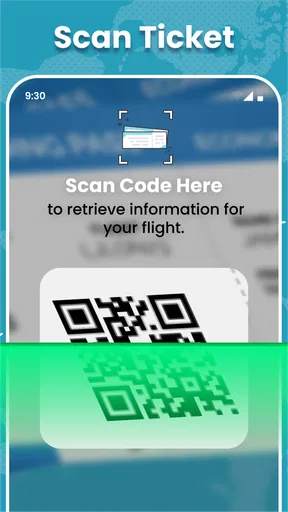
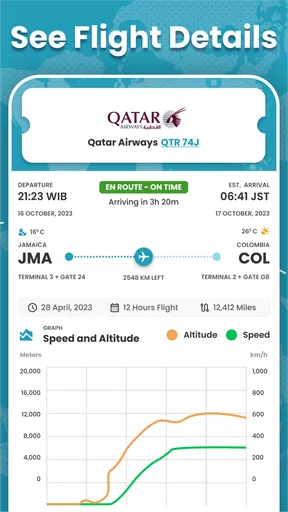
Beyond just watching planes zip around, Flymat offers a wealth of detailed information about each flight. Tap on a plane, and you'll get a treasure trove of data: flight number, departure and arrival airports, aircraft type, altitude, speed, and even the current status of the flight. For those with a thirst for knowledge, this app is like a buffet of aviation data. It’s fascinating to see how high and fast commercial jets fly, and you can even track their progress from takeoff to landing.
Customizable Alerts and Notifications
One of the things I love about Flymat is its alert system. You can set up notifications for specific flights or airports, so you never miss a beat. Whether you’re tracking a loved one’s flight or monitoring airport activity, this feature keeps you informed without having to constantly check the app. The notifications are timely and accurate, making it easy to stay updated on any changes in flight status.
Perfect for Travel Enthusiasts and Professionals
This app isn’t just for aviation geeks—though it’s a dream come true for us! It's also incredibly useful for frequent travelers and professionals in the aviation industry. Imagine being able to check your flight’s status while lounging at the airport, or keeping tabs on your company’s fleet if you’re working in logistics. Flymat makes all this information readily accessible, and it’s presented in a way that’s easy to digest.
A User-Friendly Experience
Navigating through Flymat: Live Flight Tracker is a breeze, which is a huge plus for an app with such a vast amount of information. The interface is clean and user-friendly, with everything you need just a tap away. Even if you’re not particularly tech-savvy, you’ll find it easy to get the hang of things. The developers have clearly put a lot of thought into making it as accessible as possible.
A Few Things to Consider
No app is perfect, and while Flymat has a lot going for it, there are a few areas where it could improve. For instance, the free version of the app is a bit limited in terms of features compared to the premium version. If you’re someone who wants access to all the bells and whistles, you might find yourself shelling out a bit of cash. However, the free version is still quite functional and offers plenty for the casual user.
Another thing to note is that while real-time data is fantastic, it does rely on a stable internet connection. This isn’t a deal-breaker, but something to keep in mind if you’re often in areas with spotty coverage.
Final Thoughts
All in all, Flymat: Live Flight Tracker is a fantastic tool for anyone interested in flight tracking. It’s packed with information, easy to use, and the real-time flight tracking is genuinely impressive. Whether you’re planning to use it for professional purposes or just to satiate your curiosity, it’s definitely worth checking out. So next time you see a plane soaring above, whip out your phone and satisfy that curiosity with Flymat—it’s like having your own personal window into the skies.
Pros
- Real-time flight updates available
- User-friendly interface design
- Global coverage for flights
- Customizable alerts for flights
- Minimal battery usage
Cons
- Requires internet connection
- Some ads in free version
- Limited features without subscription
- Occasional data sync delays
- In-app purchases can be pricey
FAQs for Flymat: Live Flight Tracker
What is Flymat: Live Flight Tracker and how does it work?
Flymat: Live Flight Tracker is an application designed to provide real-time flight tracking information. It allows users to view live flight data, including departure and arrival times, flight paths, and any delays or cancellations. The app uses data from various sources to ensure accuracy and provides detailed information about airports and airlines worldwide.
Is Flymat: Live Flight Tracker free to use, or does it require a subscription?
Flymat offers both free and premium versions. The free version provides basic tracking features, while the premium version, available through a subscription, includes advanced features such as real-time alerts, detailed maps, and no ads. Users can choose the plan that best suits their needs based on how frequently they travel.
How accurate is the flight information provided by Flymat?
Flymat utilizes multiple data sources, including airlines and airports, to provide the most accurate and up-to-date flight information available. While the app aims for high accuracy, users should be aware that unexpected events or last-minute changes by airlines can affect the precision of real-time data.
Can I track international flights with Flymat: Live Flight Tracker?
Yes, Flymat supports the tracking of both domestic and international flights. The app covers major airlines and airports worldwide, allowing users to monitor flights across different continents. This feature is particularly useful for frequent travelers or those managing travel for friends and family internationally.
What devices are compatible with Flymat: Live Flight Tracker?
Flymat is compatible with both Android and iOS devices, making it accessible to a wide range of users. The app is optimized for smartphones and tablets, providing a seamless experience across different screen sizes. Ensure your device’s operating system is updated to the latest version for optimal performance.


